Archive storage
Some Research groups have large amounts of data that they do not need fully accessible all of the time on more expensive, high performance storage - for example, data that has already been analysed, but needs to be kept for a few more years just in case it is needed again.
Datasets currently stored on the research data store that might only be used once or twice a year can save substantially on save annual storage costs.
Archive files are first backed up to the disaster recovery backup system and then sent to the archive. The low price is possible because the archive files are on tape media which is cheaper than disk. However the trade-off is that file access is not instantaneous, and must be recalled from tape.
Data Preparation
To store data in the archive, files must first be collated into batches (e.g. tar files) to reduce the number of files. A single 1TB file will be located on a single tape and retrieved in a few minutes, compared with 100 files of 10GB in size, could be spread over many tapes. In this case it will take much longer for each tape to be loaded in turn. The policy here would be to create a tar file containing the 100 files and send this to the archive. Compressing the files first will save costs.
Size of files in the archive
Typically we recommend preparing files for archival of between 500GB and 5TB in size. Do not create files larger than 16TB as this will exceed the tape size and will not be written to tape.
In the example below, we have a directory containing 30 large files which we wish to archive. After listing the contents of the directory, we make a tar file.
$ ls SRR015379/
SRR015379_1.recal.fast.gz   SRR015379_19.recal.fast.gz  SRR015379_28.recal.fast.gz
SRR015379_10.recal.fast.gz  SRR015379_2.recal.fast.gz   SRR015379_29.recal.fast.gz
SRR015379_11.recal.fast.gz  SRR015379_20.recal.fast.gz  SRR015379_3.recal.fast.gz
SRR015379_12.recal.fast.gz  SRR015379_21.recal.fast.gz  SRR015379_30.recal.fast.gz
SRR015379_13.recal.fast.gz  SRR015379_22.recal.fast.gz  SRR015379_4.recal.fast.gz
SRR015379_14.recal.fast.gz  SRR015379_23.recal.fast.gz  SRR015379_5.recal.fast.gz
SRR015379_15.recal.fast.gz  SRR015379_24.recal.fast.gz  SRR015379_6.recal.fast.gz
SRR015379_16.recal.fast.gz  SRR015379_25.recal.fast.gz  SRR015379_7.recal.fast.gz
SRR015379_17.recal.fast.gz  SRR015379_26.recal.fast.gz  SRR015379_8.recal.fast.gz
SRR015379_18.recal.fast.gz  SRR015379_27.recal.fast.gz  SRR015379_9.recal.fast.gz
$ tar cf SRR015379.tar SRR015379/
$ ls
SRR015379.tar SRR015379
The contents of the tar file can be inspected with tar tf <tarfile> and
extracted with tar xf <tarfile>.
Individual files can be extracted with
tar xf <tarfile> <filename>
without extracting the whole archive.
Using the archive
To request an archive share, please complete this form.
Access to the archive is granted to nominated users. Modifications to this group can be requested by emailing its-research-support@qmul.ac.uk.
Data is transferred in and out of the archive using Globus collections. We have provided a series of exercises on the learn site explaining how this works in more detail.
In the example below, a large tar file is being transferred from a collection on Apocrita called QM-Globus-Training to an archive called Archive-QM-Globus-Training.
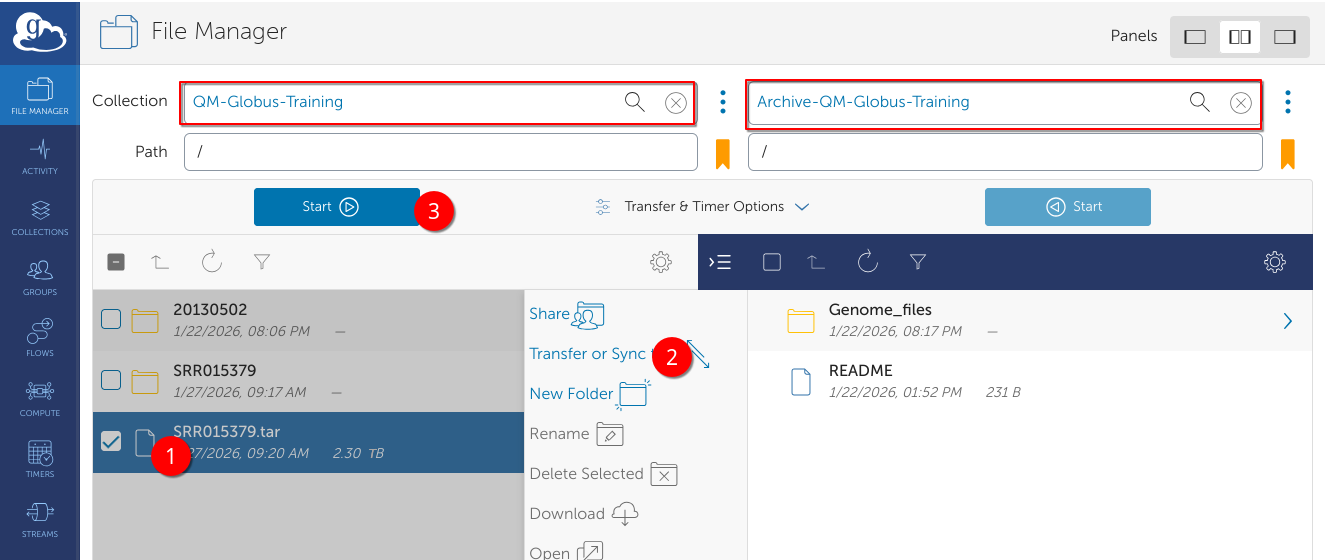
Files transferred to an Archive collection are first backed up to the disaster recovery backup system, and if the file is not accessed for 7 days, will be sent to the archive. It can be recalled at any point by submitting a transfer request to another Globus collection.